How to Save Snaps Without Them Knowing (2026, No Screenshot)
To save snaps without them knowing in 2026, skip screenshots, screen recordings and every other trick that captures your screen, because they all alert the sender. Only two methods don’t: photograph the screen with a second phone, or use SnapNinja to save the original photo or video file before you open the snap. No screenshot is taken, so there’s no screenshot alert.
One rule matters more than any trick: don’t open the snap until you’ve saved it. Every method below works best on a snap that’s still unopened, and some only work at all on one.
Updated November 2026 for the current Snapchat app on iPhone and Android.
Every method at a glance
| Method | Alerts the sender? | What you get |
|---|---|---|
| SnapNinja | No screenshot alert | Original photo or video, with sound |
| Second phone | No | Blurry photo of your screen |
| Snapchat Web | Yes | Screenshot, if the chat isn’t blurred |
| Airplane mode trick | Yes, when you reconnect | Screenshot |
| Screen mirroring | Yes | Low quality, often black |
| Screen recording | Yes | Screen capture |
| Modded / saver apps | Patched; account lock risk | Nothing that works today |
7 ways to save snaps, and which ones notify the sender
These are the methods people actually try. Only the first two don’t alert the sender, and only SnapNinja gives you the real file. Methods 3 to 6 all capture your screen, and every one of them alerts the sender. Method 7 no longer works.
1. SnapNinja: save the original file, no screenshot
SnapNinja is a cloud service you use from your phone’s browser. You connect your own Snapchat account and see the photo and video snaps friends have sent you that are still unopened, plus photos and videos saved in your chats. Tap Save on the ones you want, and SnapNinja’s servers copy the original file into your private online gallery.
Nothing is screenshotted or screen recorded, so Snapchat has no screenshot alert to send. You get the real file in full quality, videos with their sound, not a cropped capture of your screen.
Reliability: it’s the only method here that gives you the file itself instead of a picture of your screen. The one rule is order: tap Save, wait until the snap shows up in your Saved tab, then open it on your phone as normal. Snapchat doesn’t endorse third-party access, so there’s some account risk; the details are below.
Connecting and seeing what’s waiting is free. Saving is $29.99/month or $199/year.
Connect free and see what’s waiting →
2. A second phone
Open the snap on your phone and take a photo or video of the screen with another phone or a camera. Snapchat can’t see a camera that isn’t your phone, so there’s no alert.
Reliability: it works, which is why it’s the go-to free answer. The catch is quality: glare, moiré lines, blur, and tinny audio on videos. You need the second device ready before you tap the snap. Snapchat’s Replay gives you another look if you miss it, but the sender is told you replayed it.
3. Snapchat Web on a computer
Snapchat Web lets you chat from a computer browser, and people try to grab snaps with a desktop screenshot tool.
Reliability: yes, it alerts the sender, the same as a screenshot on your phone. Snapchat Web also blurs the conversation when the window loses focus, which is exactly when most screenshot tools grab the screen. Even a clean capture is a screenshot, not the file. More on the web version in how to use Snapchat on a computer.
4. The airplane mode trick
The classic: load the snap, turn on airplane mode, open it, screenshot, then clear Snapchat’s cache or wait before reconnecting. Variants add force-quitting, reinstalling, or logging out.
Reliability: yes, it alerts the sender. For years this was the trick every TikTok taught, but the screenshot alert arrives as soon as your phone reconnects. Reinstalling or logging out can also wipe anything you haven’t saved. If you’ve seen “airplane method didn’t work” threads, this is why.
5. Screen mirroring (AirPlay, QuickTime, casting)
Mirror your phone to a TV or computer and record the mirrored picture instead of your phone’s screen.
Reliability: yes, it alerts the sender, the same as a screenshot. You also often get a black screen where the snap should be, and quality is never better than the mirror.
6. Built-in screen recording
iPhone’s Screen Recording and Android’s screen recorder capture snaps, videos and sound.
Reliability: yes, it alerts the sender, the same as a screenshot. It’s fine for your own content. See screen recording on Snapchat and screenshotting on Snapchat for what each one triggers.
7. Modded Snapchat apps and “snap saver” apps
Tweaked Snapchat clients like Snapchat++, SnapEnhance and Phantom, and “snap saver” apps, promised hidden saving inside the app.
Reliability: they don’t work anymore. Snapchat has patched them or they’re gone, and Snapchat locks accounts it catches using them. SnapNinja is the only saving tool that works today. Our rundown of third-party Snapchat apps and apps to screenshot Snapchat covers what happened to them.
What actually notifies the sender (and what doesn’t)
Most “will they know?” questions come down to one thing: Snapchat alerts the sender whenever you capture the screen, on your phone or on a computer. Here’s how each action plays out.
| What you do | Does the sender know? |
|---|---|
| Screenshot a snap or chat | Yes. They get a screenshot alert. |
| Screen record a snap | Yes. They get an alert, the same as a screenshot. |
| Replay a snap | Yes. The sender sees that you replayed it. |
| Save in Chat | Yes. The saved item is highlighted for both of you. |
| Save a friend’s chat photo to camera roll | Yes. They get a notice in the chat. |
| Save your own snap to camera roll | No. It’s your snap. |
| View someone’s story | Yes. You appear in their viewer list. |
| Screenshot someone’s story | Yes. They see the screenshot icon. |
| Save a snap in SnapNinja | No screenshot alert. No screenshot is ever taken. |
A note on Save in Chat: it only works on snaps sent with no time limit and on looping videos, and in a one-on-one chat either person can delete the saved item later. To use it, press and hold the snap or message in the chat and tap Save in Chat. It’s the “official” way to keep a snap, and it’s the opposite of private: the other person sees it highlighted as saved.
Snapchat+ doesn’t change any of this. Its published features don’t include a way to save someone else’s snap without the usual alerts.
How to save snaps without them knowing with SnapNinja
- Sign in with Google. Free, no card.
- Connect your Snapchat. Enter your Snapchat username (or email) and password. They’re encrypted on your phone before they’re sent. If Snapchat asks you to approve the login in the Snapchat app, tap approve.
- See what’s waiting. Your inbox lists the unopened photo and video snaps in your chats, plus photos and videos saved in chat: who sent each one, when, and whether it’s a photo or a video. This part is free.
- Subscribe and tap Save. Saving needs a plan: $29.99/month or $199/year for unlimited saves (fair use: 1,000 a month; saving pauses at the limit). Tap Save on one snap, or use Save all in a conversation.
- Wait for it to land in Saved. Saving takes a moment. Check that the snap shows up in your Saved tab before you go back to Snapchat. If a save doesn’t go through (for example, the snap expired or was already opened), it won’t appear there.
- Now open it on your phone. Open the snap in Snapchat as normal. The sender sees “Opened” like any other snap, but you’ve already got the original, so there’s nothing to screenshot.
- Download it. Open your Saved tab and download the original photo or video to your phone whenever you like.
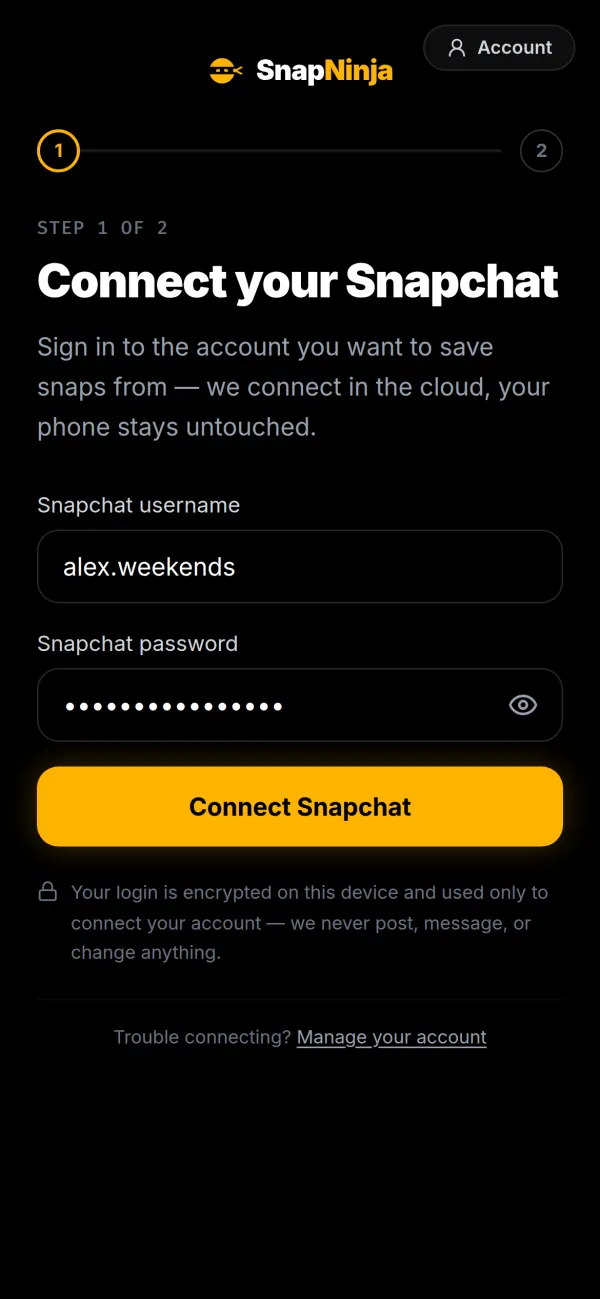
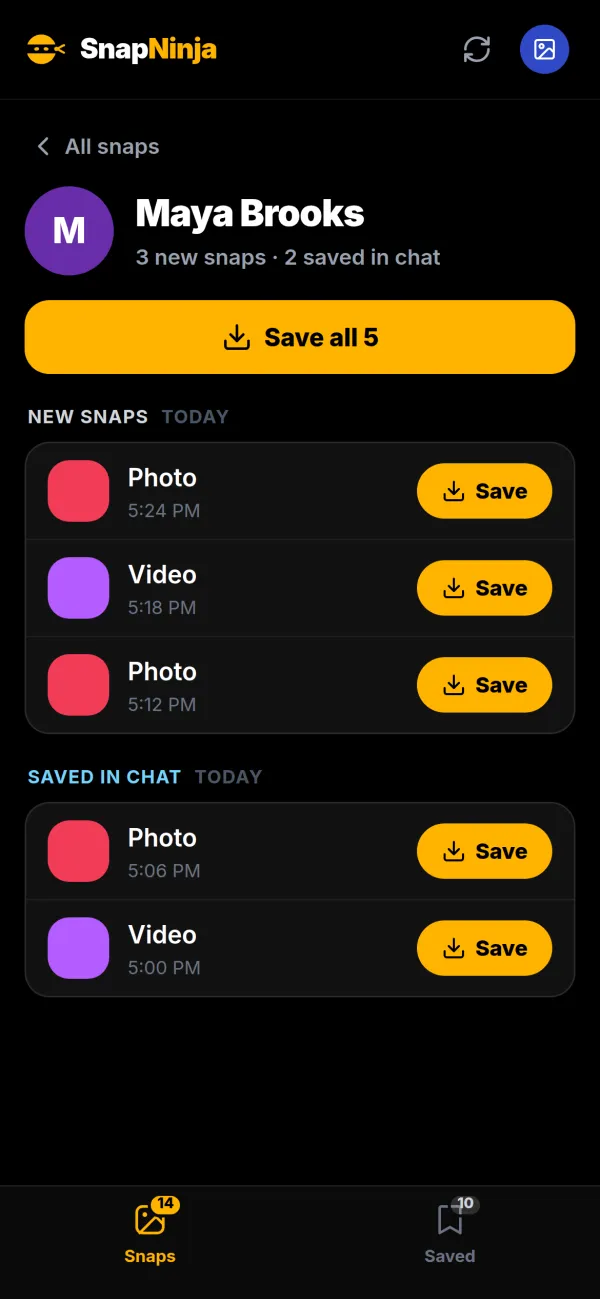
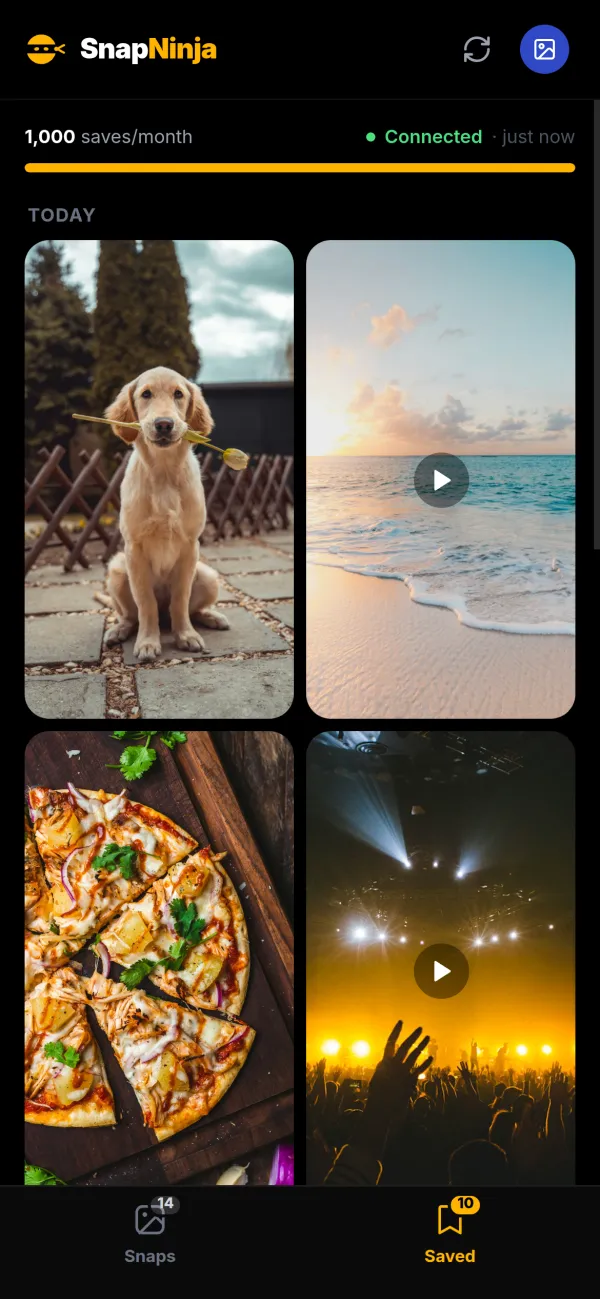
The order is the whole trick: save in SnapNinja, wait for it in Saved, then open it on your phone. Once a snap is opened on your phone it drops off SnapNinja’s list, so when a snap lands that you want to keep, check SnapNinja before you tap it in Snapchat.
Want the technical version? How SnapNinja saves without a screenshot walks through it.
How to save Snapchat pictures to your gallery without them knowing
This is what most people are really after: a pic someone sent you, in your gallery, with no “screenshot” popping up on their end.
A screenshot fails both ways. It alerts the sender, and it gives you a capture of your screen: status bar, captions, and compression included. The second-phone method skips the alert but makes the picture worse.
With SnapNinja you save the photo itself, at the resolution it was sent, then download it to your camera roll or gallery. It works for photos sent in one-on-one chats and group chats. More detail on saving Snapchat photos.
How to save Snapchat videos without them knowing
Videos are where the free tricks fall apart. Screen recording alerts the sender. A second phone gets you a shaky, glare-covered clip with room-noise audio. The airplane mode trick only ever produced a screenshot, which is useless for video, and the alert still arrives when you reconnect.
SnapNinja saves the actual video file with its original sound. When Snapchat splits a longer video into several clips, SnapNinja saves them together in one tap, so you don’t have to chase each piece. The clips stay as separate files in your gallery, and you download each one. Looping videos are just video files, so they save the same way.
See saving Snapchat videos for more. If you’re after public videos like Spotlight rather than snaps sent to you, download Snapchat videos covers that.
How to save Snapchats to your camera roll without a notification
There are two very different situations here, and mixing them up is why the answers online contradict each other.
Your own snaps. Saving a snap you took to your camera roll doesn’t notify anyone. You can set Snapchat to save snaps to Memories, Camera Roll, or both under Settings > Memories > Save Button. To pull out everything you’ve already saved in Memories, see how to export your Snapchat Memories.
Snaps friends send you. Snapchat won’t let you save a received snap to your camera roll unless it’s been saved in chat first, which both of you can see. Saving a friend’s chat photo to your camera roll also sends them a notice in the chat. To get a friend’s snap into your camera roll without any of that, save it in SnapNinja before you open it, then download it from your Saved tab.
How to save snaps without them knowing on iPhone (and Android)
SnapNinja runs in Safari on iPhone. No app to install, no jailbreak, no computer, no second device. Sign in, connect, save and download, all from the phone that received the snap.
Android is the same story in Chrome or any other browser. More on saving snaps on iPhone.
How to save Snapchat stories without them knowing
Stories work differently from snaps:
- Screenshotting a story alerts the poster, and viewing it puts your name in their viewer list.
- Public Stories, Highlights and Spotlight have a share link: copy it and paste it into a downloader that supports public Snapchat links, no login needed. More in downloading Snapchat videos and saving Snapchat stories.
- Friends’ private and Close Friends stories aren’t something SnapNinja saves. Its paid saving covers the photos and videos friends send you in chats.
How to save pictures from Snapchat chat without a screenshot
Snapchat’s chat is where most private pics land, and the screenshot alert there works exactly like it does for snaps.
SnapNinja picks up two kinds of chat media:
- New snaps: unopened photos and videos waiting in your one-on-one and group chats.
- Saved in chat: photos and videos in your chat history that someone saved in the chat. When these show up in your SnapNinja inbox, you can save them even if they’ve already been opened, because they’re still sitting in the conversation.
It saves photos and videos only, not chat text.
Is SnapNinja safe? Your password and your account
The two fair questions with any service that connects to Snapchat:
Your password. Your Snapchat login is encrypted on your device before it’s sent, and it’s used only by SnapNinja’s connection server to sign in to Snapchat for you. It’s deleted once connecting finishes. After that SnapNinja keeps an encrypted Snapchat session, not your password. You can disconnect anytime, and your saved gallery stays.
Your account. Snapchat doesn’t endorse automated access by third-party services. We haven’t observed bans, but nobody can honestly promise zero risk, and we won’t. Unlike modded apps, you keep using the normal Snapchat app on your phone.
A few practical notes:
- SnapNinja supports Snapchat’s approve-in-app login prompt, but accounts that use SMS or authenticator codes for login verification aren’t supported yet.
- Snapchat sometimes blocks a connection attempt; if that happens, wait a bit and try again. When every connection slot is in use, new connections join a waitlist.
- Your saved gallery is available while you’re subscribed, so download anything you want to keep before you cancel.
The SnapNinja FAQ covers the rest.
Frequently asked questions
Can you save snaps without them knowing?
Yes, in two ways. Screenshots, screen recordings and every other screen-capture trick alert the sender. The free option is photographing the screen with a second phone, at poor quality. The clean option is SnapNinja, which saves the original photo or video file with no screenshot, as long as you save it before opening the snap.
Does Snapchat notify if you save a picture?
It depends how. Screenshots and screen recordings notify the sender, Save in Chat is visible to both of you, and saving a friend’s chat photo to your camera roll sends them a notice. Saving your own snaps doesn’t notify anyone.
If I save a snap to camera roll, will they know?
If it’s a friend’s snap, yes: they get a notice in the chat, and the snap has to be saved in chat first anyway. To get it into your camera roll quietly, save it in SnapNinja and download it from there.
If I save my own snap to camera roll, will they know?
No. Saving a snap you took, to Memories or camera roll, doesn’t notify anyone, including people you sent it to.
If I save my own snap in chat, will they know?
Yes. Anything saved in chat is highlighted for everyone in the conversation, whoever sent it.
How do I save my chat on Snapchat?
Press and hold a message or no-time-limit snap in the chat and tap Save in Chat. It stays in the conversation, highlighted as saved for both of you. SnapNinja saves photos and videos from chats, not the text.
What does it mean when someone saves your snap in chat?
They kept it in the conversation instead of letting it disappear. It stays in the chat, highlighted as saved, until someone deletes it.
Can someone tell if you screen record Snapchat?
Yes, it alerts the sender, just like a screenshot. Screen recording is no way to save a snap quietly.
Does the airplane mode trick still work?
No. It alerts the sender: the screenshot alert arrives as soon as your phone reconnects, which is why so many people say the airplane method didn’t work for them.
Can you save snaps without them knowing with Snapchat Plus?
No. Snapchat+ adds extras like Replay Again, but its published features don’t include saving someone else’s snap without the usual alerts.
Is there an app that saves Snapchats?
SnapNinja is the only one that works today; modded Snapchat apps and saver apps are patched or gone. It isn’t an App Store app: it runs in your phone’s browser, so there’s nothing to install. Connecting and seeing your waiting snaps is free, and saving is $29.99/month or $199/year.
Why can’t I save photos from Snapchat to my camera roll?
Snapchat only lets you save a friend’s snap to your camera roll after it’s been saved in chat, and that only works for snaps sent with no time limit. For your own snaps, check where your Save Button points under Settings > Memories.
Can I save a snap I’ve already opened?
Usually not. Once a snap is opened on your phone it’s gone from SnapNinja’s list, and expired or deleted snaps can’t be recovered. The exception is media saved in chat that shows up in your SnapNinja inbox.
Can someone save your snap without you knowing?
Yes, in two ways. Anyone can photograph their screen with a second phone, and SnapNinja saves the snaps sent to the account holder without a screenshot. Screenshots, screen recordings and the other screen-capture tricks all alert you.
Where do saved snaps go?
In Snapchat, snaps you save go to Memories, your camera roll, or the chat if saved in chat. In SnapNinja, they go to the Saved tab of your private gallery, where you can view and download the originals.
The short version
Every way of capturing your screen tells the sender: screenshots, screen recordings, mirroring, Snapchat Web and the airplane mode trick. Only two ways don’t: a second phone, which gets you a blurry photo of your screen, and SnapNinja, which gets you the actual photo or video. If you want it in original quality, with no screenshot alert, save it in SnapNinja before you open it.