How to Screenshot Snapchat Without Them Knowing (2026)
In 2026, every way of capturing your screen tells the sender, on iPhone and Android: screenshots, screen recording, mirroring, Snapchat Web and the airplane-mode trick. Only two things don’t: photographing your screen with a second phone, or skipping the screenshot and saving the original photo or video with SnapNinja. No capture means no screenshot alert, and you get the real file, sound included.
Updated November 2026.
How Snapchat knows you took a screenshot
iPhone and Android both tell apps when a screenshot or screen recording happens. Snapchat listens for that while a snap, chat or story is open, and tells the other person with a note in the chat and a changed status icon.
That gives you the rulebook:
- Every screenshot or screen recording on your phone alerts the sender, whether it comes from the buttons, Assistant, Circle to Search, a remix or a recorder app.
- Capturing from somewhere else alerts the sender too: mirroring or casting to a computer, screenshots of Snapchat Web, and the airplane-mode trick, where the alert arrives when you reconnect.
- Only two things aren’t a capture, so there’s nothing to trigger the alert: a second phone pointed at your screen, or a copy of the original file.
Every method at a glance
| Method | Alerts the sender? | What you get |
|---|---|---|
| SnapNinja (iPhone, Android, any browser) | No screenshot alert | Original file with sound · from $29.99/mo |
| Second phone or camera | No | Photo of your screen |
| QuickTime mirroring (iPhone + Mac) | Yes | Low-quality recording |
| Circle to Search / Assistant (Android only) | Yes | Screenshot |
| Snapchat Web (computer) | Yes | Screenshot, often blurred |
| Airplane mode trick | Yes, when you reconnect | Screenshot |
| Built-in screen recording | Yes | Screen recording |
| Screenshot and “secret” apps (Android, jailbroken iPhones) | Patched; account lock risk | Nothing that works today |
5 ways to screenshot Snapchat without them knowing
These are the five methods people try, best first. Only the first two keep the sender from finding out. The other three still send the alert.
1. Skip the screenshot: save the original snap with SnapNinja
The cleanest way to keep a snap with no screenshot alert is not to screenshot it. SnapNinja is a cloud service you use from your phone’s browser. You connect your own Snapchat account, see the unopened photo and video snaps friends have sent you, and tap Save on the ones you want. SnapNinja’s servers copy the original file into your private online gallery.
No screenshot or screen recording happens, so Snapchat has no screenshot alert to send. And instead of a cropped picture of your screen, you get the actual photo or the full video with its sound.
Do it in this order: save the snap in SnapNinja first, wait until it shows in your Saved tab, then open it on your phone as normal. Connecting is free; saving needs a plan. Full steps below.
2. Take a photo with a second phone
Open the snap on your phone and photograph or film the screen with another phone or a camera. Snapchat can’t see a camera that isn’t your phone, so there’s nothing to alert on.
How well it works: it’s the only free way to avoid the alert, which is why every Reddit thread lands on it. The trade-off is quality: glare, blur, and room-noise audio on videos. Have the second device ready before you open the snap. Snapchat’s Replay gives you one more look, but the sender can see you replayed it.
3. Mirror your screen to a computer
On iPhone, plug into a Mac, open QuickTime Player, choose File > New Movie Recording, and pick your iPhone from the dropdown next to the record button. Android phones can cast to a computer and be recorded there.
How well it works: it doesn’t. Snapchat alerts the sender when you mirror or cast, the same as a screen recording. Quality is never better than the mirror, either.
4. Android: Circle to Search, Google Assistant and Samsung tools
Android has a few ways to grab the screen without the usual button combo: long-press the home bar for Circle to Search, say “Hey Google, take a screenshot”, or use Samsung’s Smart Select or Screen Write.
How well it works: it doesn’t. These are still screenshots taken on your phone, and Snapchat alerts the sender the same as it does for the button combo.
5. Snapchat Web on a computer
Snapchat’s web version lets you chat from a computer browser, and people grab snaps there with a desktop screenshot tool. On iPhone, some try Safari’s “Request Desktop Website” to get the same view.
How well it works: it doesn’t. A screenshot of Snapchat Web alerts the sender, the same as one on your phone. Snapchat Web also blurs the conversation when the window loses focus, which is exactly when most screenshot tools grab the screen, and you get a screenshot, not the file. More in how to use Snapchat on a computer.
Tricks that don’t work anymore (or get you caught)
The airplane mode trick
The classic: load the snap, turn on airplane mode, open it, screenshot, then clear Snapchat’s cache, log out or reinstall before reconnecting.
Today it fails: Snapchat holds the screenshot event and sends the alert as soon as your phone is back online. Clearing the cache doesn’t stop it, and logging out or reinstalling can also wipe snaps you haven’t saved.
Built-in screen recording (and “recorders that don’t notify”)
iPhone’s Screen Recording and Android’s built-in recorder both trigger Snapchat’s alert, the same as a screenshot. Third-party recorder apps on your phone use the same system capture, so they get caught too. See screen recording on Snapchat for the details.
The half-swipe and “remix snap” tricks
Half-swiping lets you peek at a chat without marking it read, but a screenshot taken mid-peek still alerts the sender, and snaps don’t open in the peek at all. A recent video claims remixing a snap avoids the alert. It doesn’t: a screenshot of a remix alerts the sender like any other.
How to screenshot Snapchat without them knowing on iPhone
On iPhone, screenshots, screen recording and QuickTime mirroring to a Mac all alert the sender, and App Store apps can’t reach inside Snapchat. That leaves two real options:
- A second phone. Free, works, looks rough.
- SnapNinja in Safari. No app, no jailbreak, no computer, no second device. Connect, save, and download from the same iPhone that got the snap.
More on saving snaps on iPhone with no alert.
Snapchat screenshot apps: which ones still work?
Search “snapchat screenshot app” and you’ll find a pile of apps promising secret screenshots. None of them work today. They’re patched or gone, and Snapchat locks accounts it catches using them. SnapNinja is the only tool that works today, and it doesn’t take a screenshot at all.
Private Screenshots, ShotSaver and other Android screenshot apps
Private Screenshots, ShotSaver and generic “Screenshot” apps on the Play Store capture through Android’s accessibility features or an overlay button.
Reality: they’re patched. Snapchat still sees the capture and alerts the sender, Private Screenshots’ own listing says it doesn’t work in apps that block screenshots, and Snapchat locks accounts caught using them. None of these exist for iPhone.
Secret screenshot apps: SecretShot, Snapper and jailbreak tweaks
SecretShot, Snapper, Phantom, Wicked and similar tweaks hooked into Snapchat on jailbroken iPhones to suppress the alert.
Reality: they’re patched or gone. Most stopped being updated years ago, and Snapchat locks accounts it catches running tweaks.
Modded Snapchat clients like Casper
Modified Snapchat apps like Casper, Snapchat++ and SnapEnhance promised hidden saving and screenshots built in. Reality: they’re patched or gone. Snapchat’s terms don’t allow unofficial clients, and Snapchat locks accounts it catches using them. Our rundown of third-party Snapchat apps covers which ones are dead and why.
Screenshot extensions and desktop screen recorders
Browser screenshot extensions and desktop recorders only work on Snapchat Web or an emulator on a computer. They’re still screen captures, so the sender gets the alert, and they inherit Snapchat Web’s blur problem. They do nothing for the Snapchat app on your phone.
Spy and monitoring apps
Some “Snapchat screenshot” results are monitoring apps for watching someone else’s phone, not saving snaps sent to you.
Is there an iPhone app that screenshots Snapchat without notification?
Not in the App Store. iPhone apps can’t screenshot inside another app quietly. SnapNinja runs in Safari instead, with nothing to install, and saves the original file rather than screenshotting.
Skip the screenshot: how to save a snap with SnapNinja
Every screen capture above alerts the sender. SnapNinja removes the screenshot, so there’s no screenshot alert at all.
- Sign in with Google. Free, no card.
- Connect your Snapchat. Enter your Snapchat username (or email) and password (how your login is handled). They’re encrypted on your phone before they’re sent. If Snapchat asks you to approve the login in the Snapchat app, tap approve.
- See what’s waiting. Your inbox lists unopened photo and video snaps from your one-on-one and group chats, plus photos and videos that were saved in chat. You see who sent each one, when, and whether it’s a photo or video. This part is free.
- Subscribe and tap Save. Saving needs a plan: $29.99/month or $199/year for unlimited saves (fair use: 1,000 a month). Tap Save on one snap, or use Save all in a conversation.
- Wait for it to land in Saved, then open the snap on your phone. Open it in Snapchat as normal. The sender sees “Opened” like any other snap, but you already have the original.
- Download it. Open your Saved tab and download the original photo or video to your device. Your gallery stays viewable and downloadable while you’re subscribed.
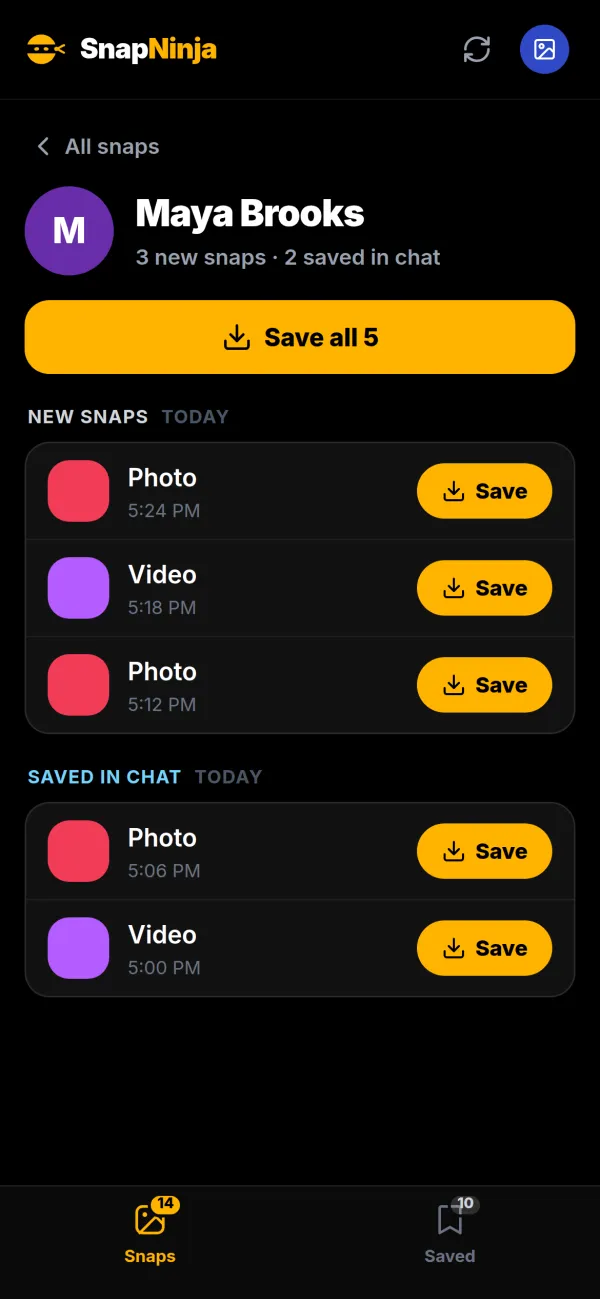
The rule that makes it work: save first, open second. Once you open a snap on your phone it drops off SnapNinja’s list. Opened snaps are unavailable unless they were saved in chat, and expired snaps can’t be recovered. When a snap you want arrives, check SnapNinja before you tap it in Snapchat.
Connect your Snapchat free and see what’s waiting →
Want the technical version? How SnapNinja saves without a screenshot walks through it.
Snaps vs chats vs stories: what notifies
Most conflicting answers online come from mixing these up.
| What you capture | Sender told? | What works instead |
|---|---|---|
| Photo snap | Yes | Save in SnapNinja before opening |
| Video snap | Yes, screenshot or recording | Save in SnapNinja, sound included |
| Photos and videos in a chat | Yes | SnapNinja (unopened or saved in chat) |
| Chat text | Yes | Second phone |
| A friend’s story | Yes, and viewing puts you on the viewer list | Second phone |
| Public Stories, Highlights, Spotlight | Yes, for screenshots | Copy the public link into a downloader (more on public videos) |
Save in Chat is Snapchat’s official way to keep a snap, and it’s visible to both of you. It only works on photos sent with no time limit and looping videos. More on public stories in saving Snapchat stories.
How to screenshot Snapchat chat without notification
A chat screenshot alerts the other person just like a snap screenshot. For text, use a second phone and photograph the screen as you scroll, so a long conversation comes out as a series of overlapping shots. SnapNinja doesn’t save chat text, but it does save the photos and videos sent in your chats, in original quality. More on saving Snapchat photos, saving Snapchat videos, and saving snaps without them knowing.
Will you get banned for screenshotting?
Normal screenshots: no. Screenshotting is a built-in feature. The sender gets a screenshot alert, and nothing happens to your account.
Mods and jailbreak tweaks: yes, when Snapchat catches them. This is where account locks come from. Snapchat doesn’t allow unofficial clients and locks accounts it catches running them. They’re patched anyway, so there’s nothing to gain.
SnapNinja: no bans seen, no promises. Nothing is installed or modified on your phone. But Snapchat doesn’t endorse automated access by third-party services, so while we haven’t observed bans, we won’t promise zero risk. The SnapNinja FAQ covers the rest.
Frequently asked questions
Can someone tell if I take a screenshot on Snapchat?
Yes. Screenshotting a snap, chat or story alerts the other person, on iPhone and Android. They see a note in the chat and a changed status icon on the snap.
Is there a way to save pics on Snapchat without them knowing?
Yes. Photograph your screen with a second phone (the free option), or save the original photo in SnapNinja before you open the snap. SnapNinja takes no screenshot, so there’s no screenshot alert.
Can you turn off screenshot notifications on Snapchat?
No. There’s no setting for it, on your side or the sender’s.
Does Snapchat notify when you screen record on airplane mode?
Yes, it alerts the sender. The alert arrives as soon as your phone reconnects, so the airplane trick only delays it.
Does Snapchat detect screen recording, including on Samsung?
Yes. Built-in recorders on iPhone, Android and Samsung phones trigger the same alert as a screenshot.
How do you screen record Snapchat without it showing on iPhone?
Not with the built-in recorder, and not with QuickTime mirroring to a Mac: both alert the sender. Film the screen with a second phone, or save the original video with SnapNinja in Safari, sound included.
How do you screenshot Snapchat Web?
Use your computer’s screenshot tool, but it alerts the sender, the same as a screenshot on your phone. It also often fails because Snapchat Web blurs the chat when the window loses focus.
Can I see who screenshotted my public Snapchat story?
Screenshots of your story show up in its viewer list. On public stories with lots of viewers, you see screenshot counts in the story’s insights rather than a full list of names.
Can you screenshot a Snap profile without them knowing?
Not a friend’s. Screenshotting a Friendship Profile (the shared profile you see when you tap a friend) alerts that friend, the same as a snap screenshot.
How do you save to camera roll on Snapchat without them knowing?
Save the snap in SnapNinja before opening it, then download it from your Saved tab to your device. Saving through Snapchat itself means Save in Chat, which they can see.
Is it safe to give SnapNinja my Snapchat login?
Your Snapchat password is encrypted on your device before it’s sent, used only by SnapNinja’s connection server to sign in for you, and deleted once connecting finishes. After that SnapNinja keeps an encrypted Snapchat session, not your password. Snapchat’s approve-in-app login prompt is supported; accounts that use SMS or authenticator codes for login verification aren’t supported yet.
The short version
Screenshots, screen recordings, mirroring, Snapchat Web and Save in Chat all tell the sender. Airplane mode only delays the alert, screenshot apps and mods are patched and put your account at risk, and a second phone works but looks bad. If you want the actual photo or video in original quality with no screenshot alert, save it in SnapNinja before you open it.